

 Risk assessment, monitoring, and auditing
 in one platform
MonitorMate helps life sciences compliance teams run their monitoring program from start to finish. You score where risk sits, plan how much to review, record each review, and track every finding to closure. Each decision is documented, so you can show an auditor what you did and why.
What's included
- Risk assessment and mitigation plans
- Risk-based monitoring plans
- Live, transactional, and audit reviews
- Communications monitoring
- Receipt and sign-in sheet processing
- Remediation tracking
- Dashboards and predictive analytics
Show that your program is risk based and documented

Regulators don't expect you to review every speaker program, meal, or expense report. They expect a program that looks hardest at your highest risks, and a record of why you made each decision.
MonitorMate is built around that standard. It follows your program through the year and keeps the evidence as you go, so your audit file is ready when you need it.
Set up for your program
Your activity types, forms, rules, and approval chains
Ready for global teams
Organize work by cluster, region, and country, in multiple languages
Made for life sciences
Forms for speaker programs, advisory boards, meals, and more
How a monitoring year works
- 1
Assess risk
Score each activity in each country
- 2
Plan
Decide how much of each activity to review
- 3
Monitor
Review activity live, at your desk, and in email
- 4
Record findings
Log what each review found
- 5
Investigate
Confirm what happened
- 6
Remediate
Assign fixes and track them to closure
- 7
Report
Show progress against the plan
Score your risk by activity and country
Inherent risk
People who run each activity answer plain questions about how it's done.
Control effectiveness
They rate your policies, training, and process controls.
Total risk
Each half counts equally toward the score.
Mitigation plan completed and reviewed
Without a finished plan, residual risk stays equal to total risk.
Residual risk
The lower score, once controls are proven to work.
Build scores people can defend
- Survey questions are written so an honest answer gives the right score
- Answers from many people are averaged into one score per activity
- Compliance officers can override a score, with a written reason on record
- Each country's top risks become the starting list for mitigation plans
Assign mitigation plans with owners and dates
For each top risk, you set the actions, the owner, and the due date. Owners get an email that links straight to their task. A plan closes only after a compliance officer reviews the evidence the owner uploads.
Mitigation and remediation are tracked separately
- Mitigation
- Prevents problems. It comes from your risk assessment, before any review.
- Remediation
- Fixes problems. It follows a finding from a review.
Plan how much to review
Your risk scores decide where reviewers spend their time. Higher-risk activities get more coverage, and the plan records the reason for each target.
- Set review targets by activity type, country, and quarter
- Choose live, transactional, or audit review for each activity
- Track planned against completed reviews all year
- Spot shortfalls early, while there's still time to close them
Choose samples with EZPredict
EZPredict scores individual transactions, such as travel and meal expenses, so you can sample the riskiest records first. It works alongside RAMP. RAMP scores activities, and EZPredict scores the records inside them.

Review activity four ways


-
Live monitoring
Attend speaker programs, advisory boards, and other events, and record what you see on an iPad.
- Checklists for each activity type
- Photos and notes on the record
- Results sync to your dashboards
-
Transactional review
Review expenses, payments, and CRM activity from your desk.
- Spending cap and frequency checks
- Fair market value checks
- Alerts when a policy limit is crossed
-
Communications monitoring
Scan email and chat for policy-sensitive language. AI flags messages, and your reviewers decide.
- Models trained on your policies
- Flagged messages queued for review
- A record of every decision
-
Documents and sign-in sheets
Read receipts and sign-in sheets, including handwritten ones, and check them against the expense.
- Names, venues, and amounts pulled out
- Mismatches sent for review
- Original kept with the record
How a sign-in sheet gets checked
| Name | Credential | Signature |
|---|---|---|
| MD | ||
| NP | ||
| MD | ||
| PharmD | ||
| MD | ||
| RN | ||
| Sales | ||
| Sales |
| Field | Sheet | Expense | Result |
|---|---|---|---|
| Program date | Mar 3 | Mar 3 | Match |
| Venue | Harbor Bistro | Harbor Bistro | Match |
| Attendees | 8 | 9 | Review |
| HCP attendees | 6 | 7 | Review |
Every review follows the same path
- Draft
- Pending review
- Review complete
- Pending remediation
- Closed
Each record shows how complete every section is, and the audit trail keeps each change with the person and time.
Track every finding to closure
When a review finds a problem, you log it, confirm what happened, and assign a fix. The finding stays open until the fix is done and checked.
- Give every finding an owner and a due date
- Choose an action, such as a process change, a coaching memo, or an awareness email
- Send reminder emails automatically
- Close a finding only after someone reviews the evidence
- Update or upload many records at once
- See who changed what, and when, in the audit trail
One finding, start to finish
Example, continuing from the sign-in sheetFinding logged
The expense report lists 7 HCPs. The sign-in sheet shows 6.
MonitorInvestigated
One HCP was entered twice on the expense report.
Compliance administratorRemediation assigned
Corrective, process change: add a duplicate check before submission. Due Apr 6.
Owner notified by emailEvidence uploaded
Updated submission checklist attached.
OwnerClosed
Evidence reviewed and accepted.
Compliance administrator
See where your program stands
Swipe to see the whole dashboard
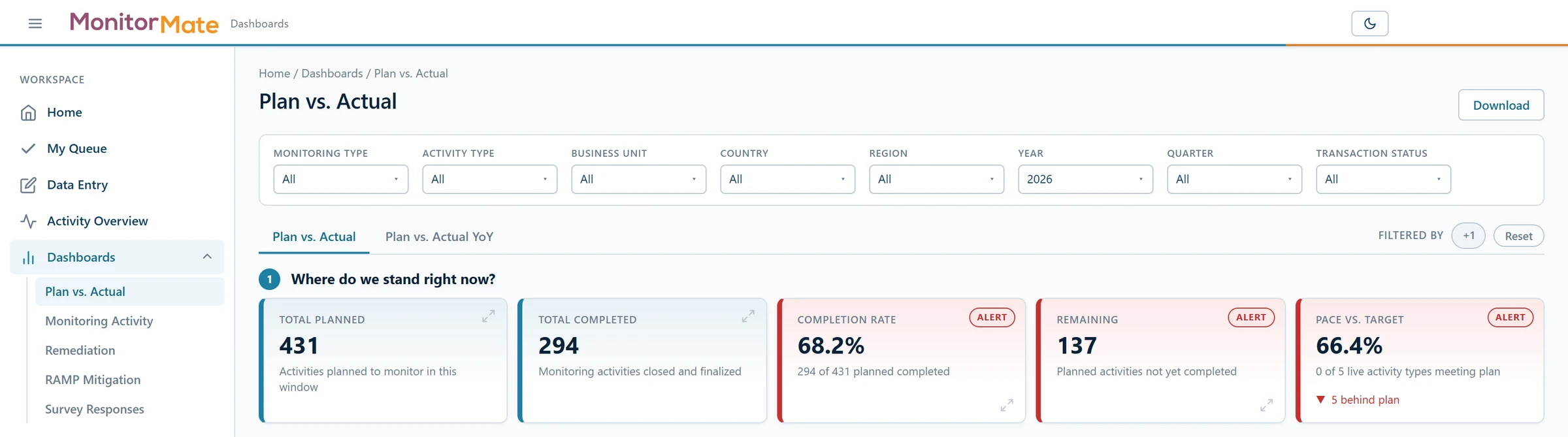
Start with Plan vs Actual
Most compliance teams open this dashboard first. It shows the plan you set in step 2 against the reviews your team has completed, so you can see at a glance whether the year is on track. Dashboards update as your team works, so you can answer "how far along are we?" without building a report.
- Filter any view by cluster, region, country, year, or activity type, then export it
- See how much of the plan is done. Here, 63 of 120 planned reviews, or 52.5 percent
- Compare planned and completed reviews for each activity type
Other dashboards
Which findings are still open?
See open and closed findings by activity type, and how long open items have waited.
Filter by owner, department, remediation type, policy, or business partner.
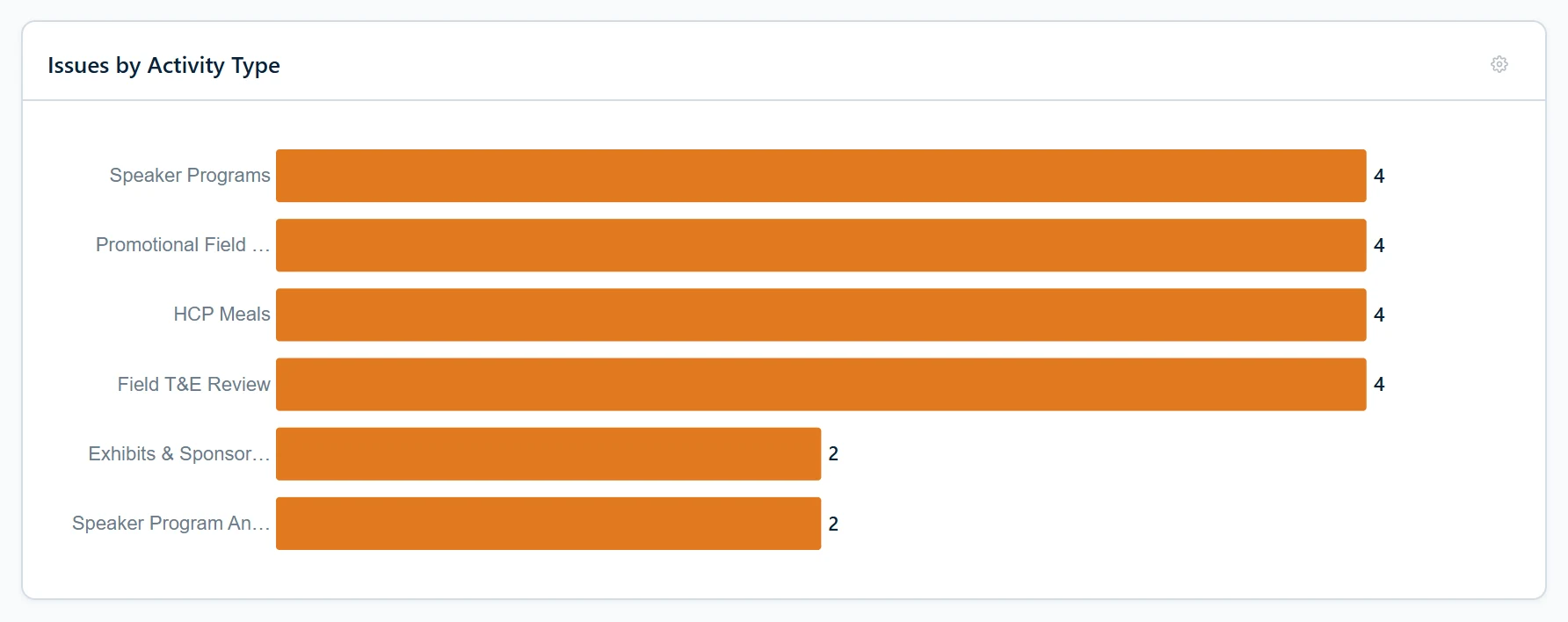
Are mitigation plans getting done?
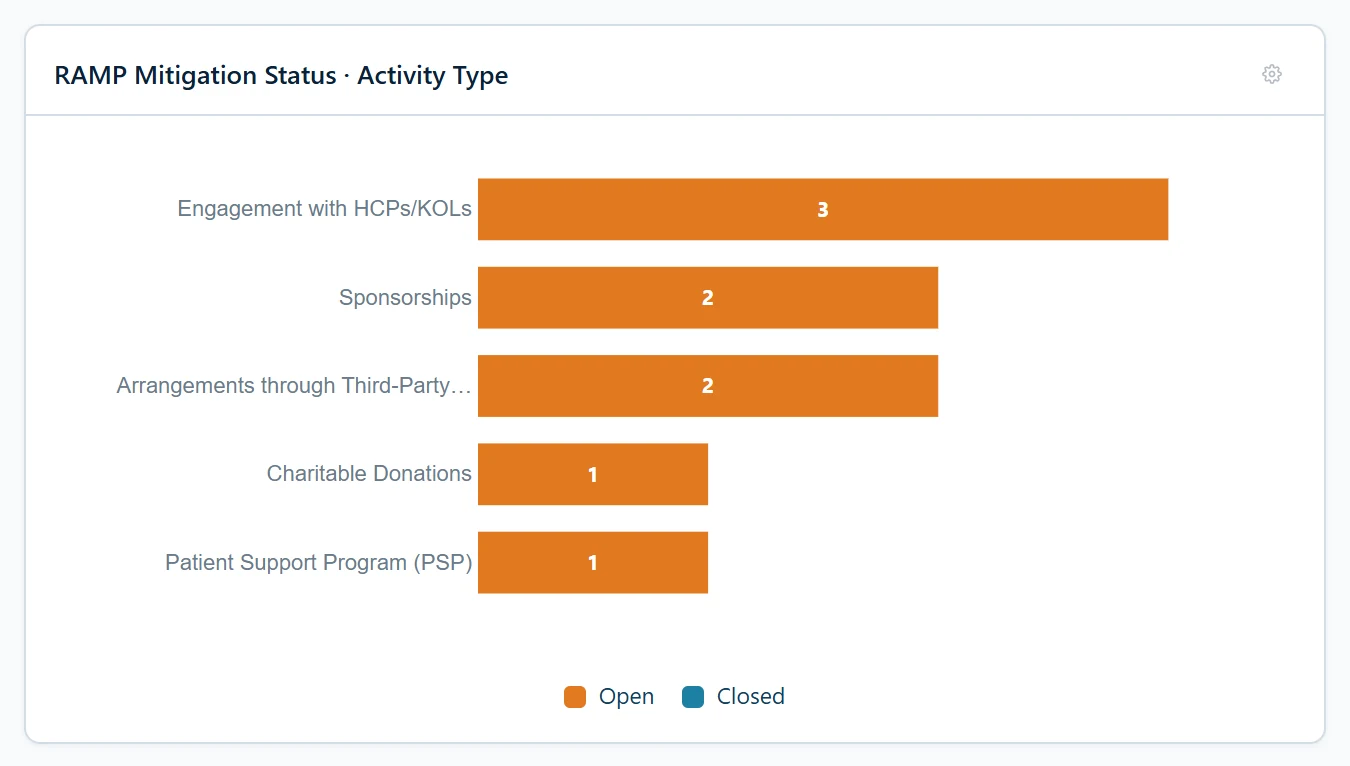
See open and closed mitigation measures by activity type, and by type of measure, such as training, policy updates, or audits.
Filter by owner or RAMP risk level.
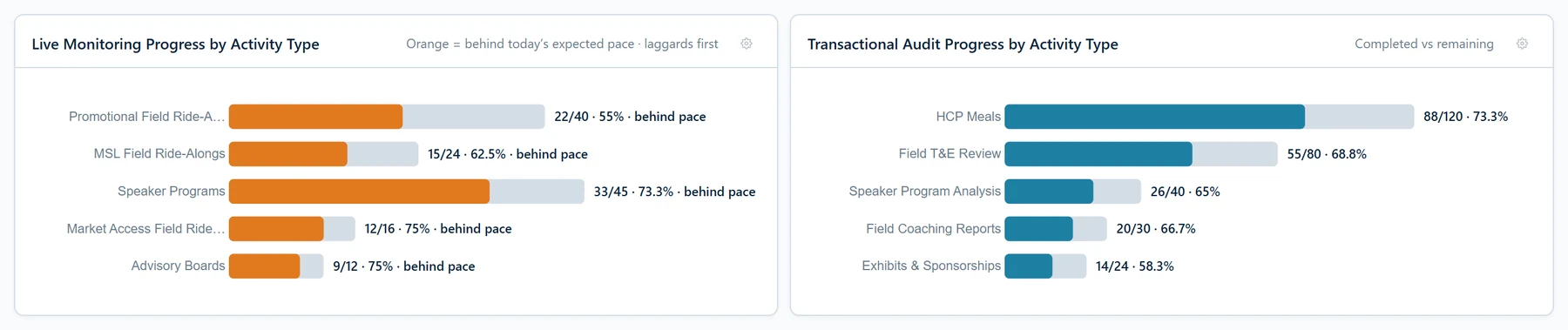
Are we on track against the plan?
Compare planned and completed reviews for transactional, live, and audit monitoring.
Filter by cluster, region, country, template, or activity type.
Dashboards and reports
Dashboards in MonitorMate
- Plan vs actual
- Monitoring activity
- Remediation
- RAMP mitigation
- Email monitoring
- Survey responses
Insight reports in Power BI
- Concur expenses and meals
- Speaker programs
- Veeva CRM activity
- Grants and sponsorships
- Medical information requests
When you need more
- Ad hoc reports
- Year-over-year comparisons
- Predictive risk signals from EZPredict
- Excel export from any dashboard
Works with the data you already have
MonitorMate brings system feeds and everyday documents into one data layer. Reviews, dashboards, and AI tools all work from the same records.
Systems and feeds
- Travel and expense, including Concur
- Speaker programs
- SAP and direct payments
- HCP consulting and engagements
- Grants and sponsorships
- Publications
- CRM, including Veeva
- HR systems, including Workday
- Medical information requests
- Hotline and investigations
- Sales alignment rosters
- Learning management systems
- Veeva Vault and content review
- Sales operations and compensation
Documents and messages
- Chat messages
- Sign-in sheets
- Receipts
- Call notes
- Monitoring notes
- Social media posts
AI that shows its sources
MonitorMate uses AI to read and sort large volumes of documents and messages. Your team makes every decision, and each one is recorded.
Life Sciences GPT
Ask about your policies and SOPs in plain English. Answers cite the document and page.
Database search
Ask questions of your monitoring data without writing a query.
Communications monitoring
Sort email and chat so reviewers see the riskiest messages first.
Intelligent Document Processor
Pull data from receipts and sign-in sheets, then check it.
EZPredict
Score transactions to guide which records you sample.
In-app assistant
Get answers without leaving the screen you're working on.
Your Advisory Board SOP requires sign-off from Medical Affairs and Compliance before any invitations go out.
Answers come only from documents your team uploads.
Built for compliance teams, not IT departments
Templates and rules
Build forms, sections, and validation rules for each activity type
Workflows
Set approval chains, delegate work, and send email alerts
Global setup
Map clusters, regions, countries, and users
Languages
Translate screens and labels for local teams
Document repository
Store files and share them with the right people
Single sign-on
Sign in with your company account
Bulk updates
Upload or change many records at once
Audit trail
Keep a time-stamped history of every change
How MonitorMate compares
- Full capability
- Partial or limited
- Not offered
| Capability | MonitorMateCresen Solutions | Competitor 1Consulting led | Competitor 2Consulting and software | Competitor 3Case management | Competitor 4Spend analytics |
|---|---|---|---|---|---|
| AI email monitoring | Full | Advisory only | Text analysis | Not offered | Not offered |
| Ethics and compliance hotline | Through EthosLine | Not offered | Not offered | Full | Not offered |
| Risk assessment and heat maps | RAMP | Manual | Manual | General | Spend only |
| Mitigation plans and remediation | By control theme | Advisory only | Not offered | Workflow only | Not offered |
| Multichannel communications monitoring | Email and chat | Not offered | Email only | Not offered | Not offered |
| Regulatory change management | Full | Advisory only | Partial | Not offered | Not offered |
| Real-time dashboards | Full | Not offered | Limited | Cases only | Full |
| Third-party risk management | Full | Advisory only | Partial | Not offered | Spend only |
Scroll the table sideways to see every vendor.

See MonitorMate with your own activity types
Tell us which activities and countries you manage, and we'll show you how MonitorMate handles them.